HelpHelpProperties and tenancies
The rent account: rent due, payments and arrears
Keep each tenancy's rent account in Abide.Rent: the rent due each period, every payment, the running balance and the Ground 8 level.
- Reviewed
- Read
- 4 min
Each tenancy can have a rent account. Abide.Rent works out the rent due from the tenancy's rent and how often it is paid, including any increase on record, and you record what was received.
Who this is for: letting agencies and landlords.
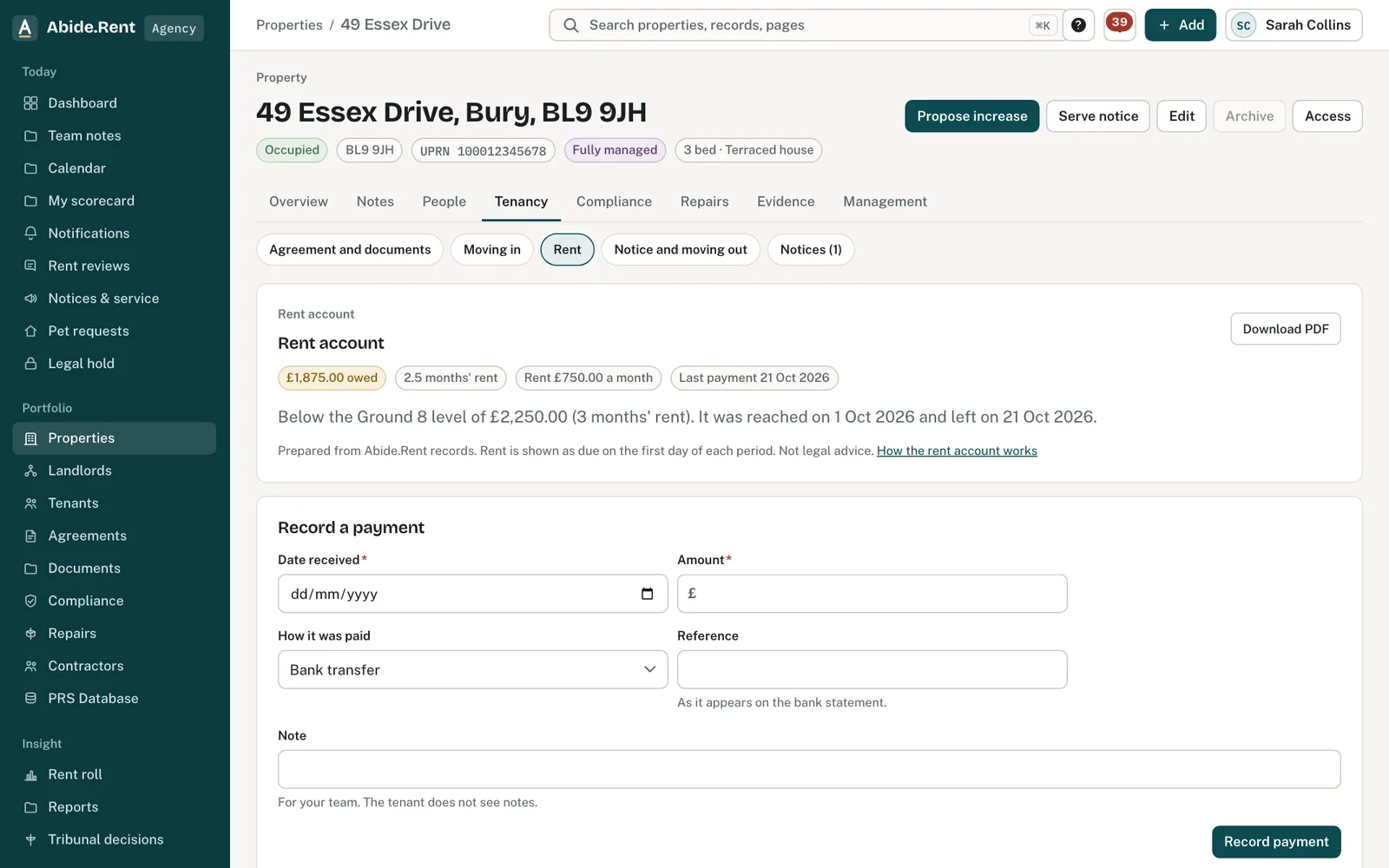
The rent account: balance, schedule and payments.
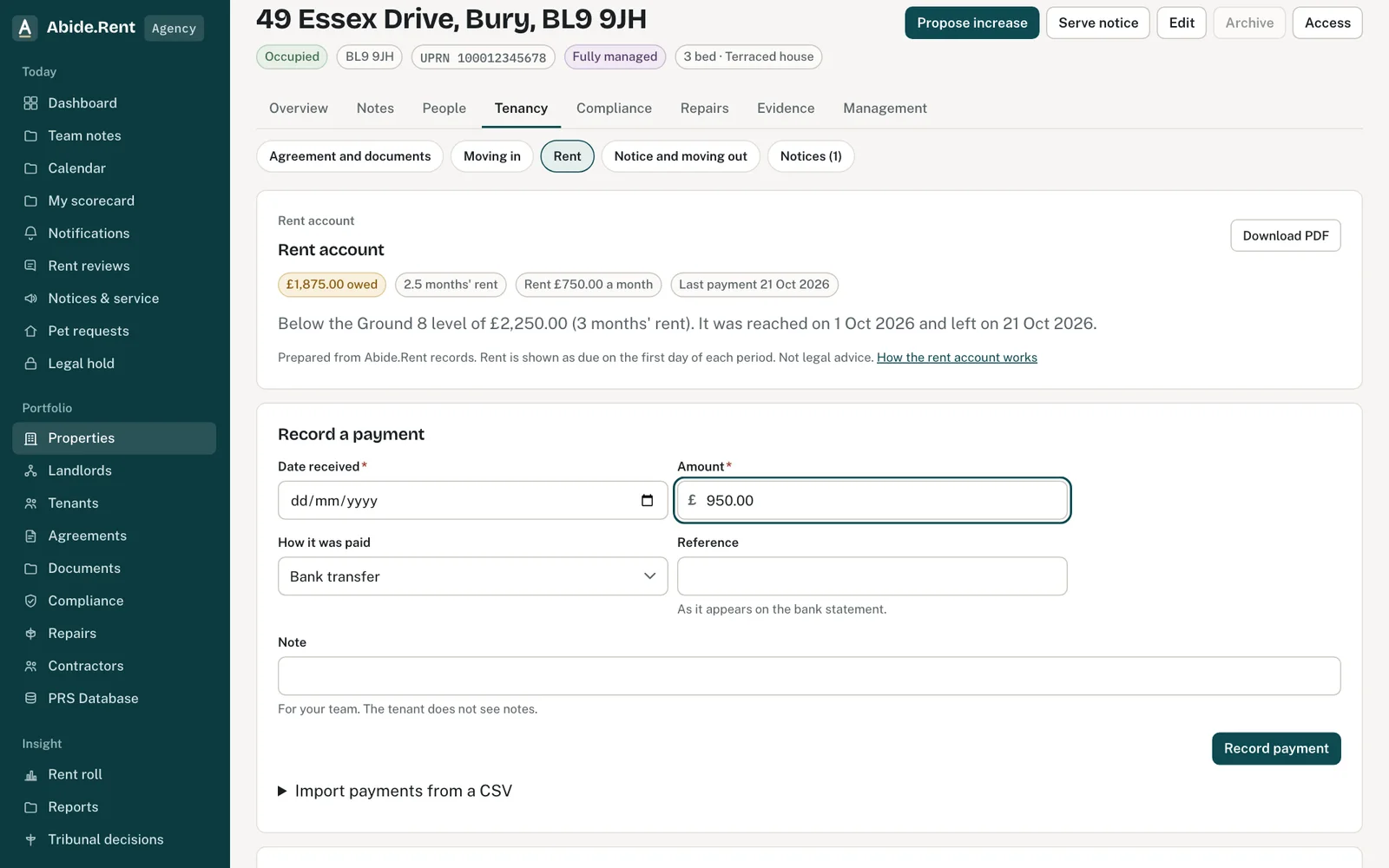
Record a payment: date, amount, how it was paid and the reference.
What you are deciding
When the account starts, what was owed on that day, and how you will record payments: by hand, or from your bank's CSV.
Your options
- Record payments by hand. Enter the date received, the amount, how it was paid and the bank reference. A note is for your team; the tenant never sees it.
- Import a CSV. Upload a file with a date, an amount and a reference for each payment. You see every row first: rows that match a rent period, rows that will be added anyway, rows already recorded and rows that cannot be read. Only the good, new rows are saved.
- Correct a mistake. Select Reverse on the payment. A reversal entry is added beside it and the balance goes back up. Nothing is ever deleted, so the account stays a true record.
- Start part way through a tenancy. Choose a later start day and enter the balance owed on that day. A part period at the start is charged by the day.
How to do it
- Open the property and select the Rent tab.
- Choose the day the account starts and any balance brought forward, then select Start the rent account.
- Record each payment as it arrives, or import a CSV from your bank.
- Check the balance, the number of rent periods owed and the Ground 8 line at the top.
- Select Download PDF for a dated copy to send to the tenant or to file with a possession claim.
How the balance is worked out
Rent is shown as due on the first day of each rent period, for monthly, weekly, fortnightly and four-weekly rent. A served rent increase counts from the date the new rent starts, unless the tenant referred it to the tribunal. The balance is the rent due less the money received.
The Ground 8 level
Abide.Rent shows when the balance reached 3 months' rent (or 13 weeks' rent where rent falls due by the week), measured against the rent in force that day, and when it fell back below. The arrears must be at that level both when a notice is served and at the hearing; whether the ground is made out is for the court. The same figures feed the Ground 8 deadline, the Section 8 notice and the possession bundle.
Who sees it
The agency or landlord account that manages the tenancy keeps the rent account. A landlord whose home an agent manages can read it, and the tenant can read their own, without your notes.
A worked example
A tenancy at £950.00 a month starts on 1 July 2026 and the account is started that day. The tenant pays on 1 July and 1 August 2026, then nothing more. On 1 October 2026 the balance is £1,900.00, two months' rent, and the Ground 8 level of £2,850.00 has not been reached. A CSV from the bank on 5 October 2026 shows a payment of £500.00 on 2 October 2026 with the reference "FLAT 2 RENT": it is added, and the balance falls to £1,400.00.
What Abide.Rent does for you
- Works out the rent due each period from the tenancy, including recorded increases.
- Keeps a running balance and the arrears in money and in rent periods.
- Shows the dates the balance reached and left the Ground 8 level.
- Skips a CSV row with the same date, amount and reference as a payment already recorded.
- Records every payment, import and reversal with who did it and when.
- Adds the account to the possession bundle for a Section 8 notice.
If something goes wrong
- “Start the rent account before recording payments: choose the day it starts and any balance brought forward.”
What to do: Start the rent account first. - “The date received is before the rent account starts on …”
What to do: Check the date, or start the account earlier. - “This tenancy has a rent account in Abide.Rent. Record the payment there instead.”
What to do: Record payments on the Rent tab, not as an arrears entry. - “Rent frequency must be monthly, weekly, fortnightly or every four weeks.”
What to do: Choose how often the rent is due under the tenancy. Enter the rent for one of those periods, not a converted figure.
Common mistakes
- Starting the account from the tenancy start date when only recent payments are to hand. Start it later and enter the balance owed on that day.
- Recording a payment twice and leaving both. Reverse the second one.
- Treating reaching the Ground 8 level as the end of the matter. A notice and the court's decision are separate steps.
What to do next
More in Properties and tenancies
 Add a tenancy and joint tenantsRecord who lives in a property, the rent and the start date. Add joint tenants, permitted occupiers and guarantors to the same tenancy.
 Damp, mould and emergencies: Awaab's Law stages (proposed)Choose to work to the Awaab's Law timescales on damp, mould and emergency repairs. They apply to social housing; for private renting they are proposed, not law yet.
 Is it fixed? The tenant's answer on a repairWhen you mark a repair fixed, the tenant is asked whether it is. A yes is recorded; still a problem opens it again.