HelpHelpProperties and tenancies
UPRN, LRN and PRN
Store each property's identifiers: the UPRN, and the Landlord and Property Registration Numbers once the PRS Database issues them.
- Reviewed
- Read
- 2 min
A property's identifiers live on its Identifiers tab. Type the UPRN when you have it. The Landlord Registration Number (LRN) and Property Registration Number (PRN) come from the government's PRS Database, which opens region by region from 15 December 2026.
Who this is for: letting agencies and landlords.
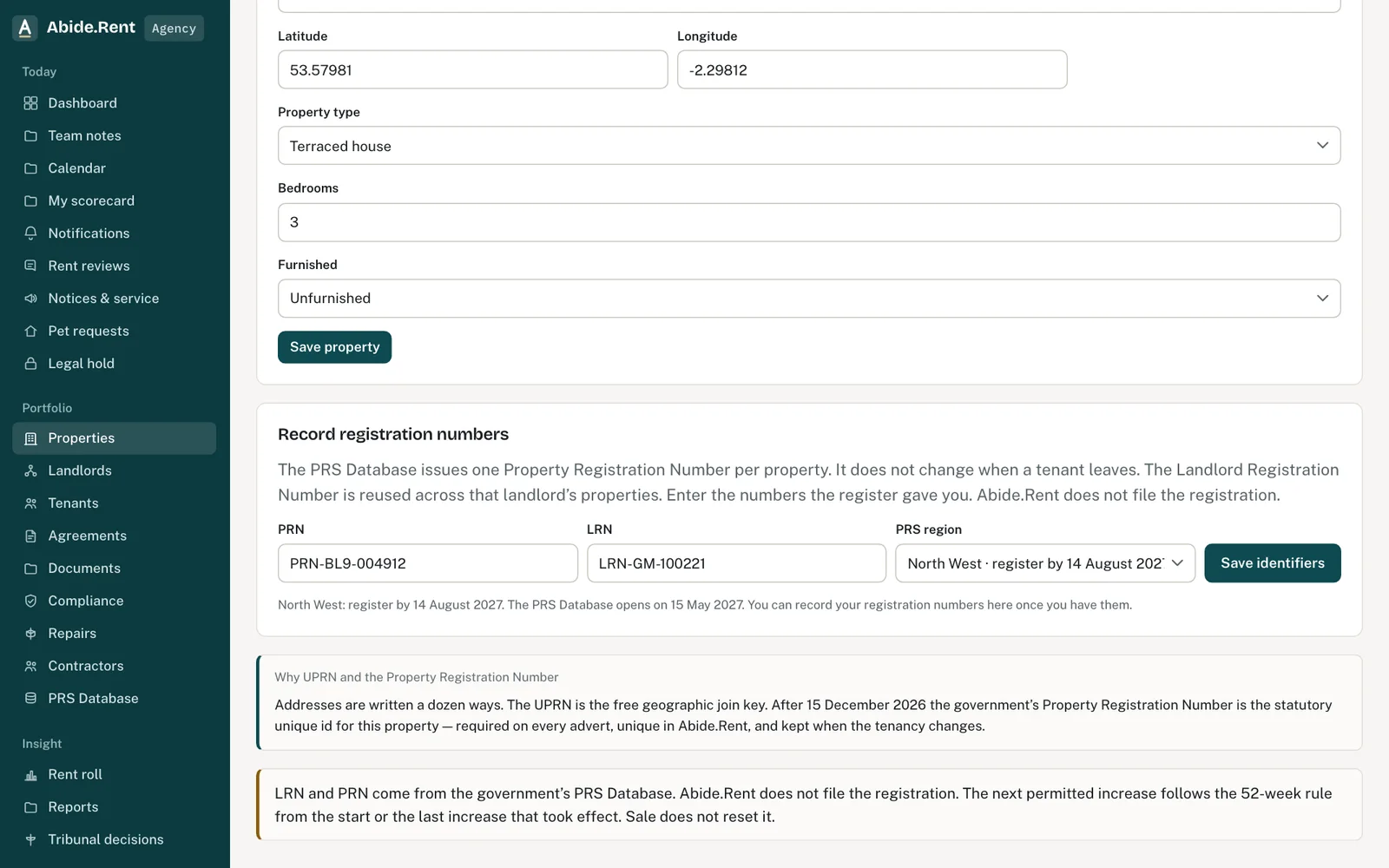
The property’s identifiers and its PRS Database numbers.
What you are deciding
Which numbers to record now, and which to add once the register issues them.
Your options
- UPRN. Type it when you have it. Saving one marks the property as matched.
- PRN and LRN. Add them once you have registered. Both must appear on adverts after your region's deadline.
- PRS region. Set from the postcode. Change it if the postcode is new or wrong.
How to do it
- Open the property and select Identifiers.
- Under Edit identifiers, type the UPRN, title number, registration numbers, council tax band, EPC rating and local authority, then select Save identifiers.
- The map pin is the latitude and longitude under Edit property.
A worked example
On Monday 17 May 2027, two days after the North West window opens, J Ashworth registers 49 Essex Drive and receives PRN-BL9-004912 and LRN-GM-100221. Northgate Residential records both on the property. The PRS Database page now shows 49 Essex Drive as Recorded.
What Abide.Rent does for you
- Stores a UPRN you type, and marks the property as matched.
- Shows which properties are still missing registration numbers.
- Puts the numbers on the property so they can go on adverts.
If something goes wrong
- “Region not known: check the postcode or set the region”
What to do: Fix the postcode, or choose the PRS region on the Edit tab. - The UPRN shows as unmatched
What to do: Type the UPRN under Edit identifiers and save. Saving one marks it as matched. - “Only the account that manages this property can change its details or archive it.”
What to do: Ask the managing account to change it.
Common mistakes
- Expecting Abide.Rent to register the property. It does not file the registration and does not check the numbers you record.
- Recording a PRN against the wrong address: a PRN belongs to one home and does not change when a tenant leaves.
What to do next
More in Properties and tenancies
 Add a tenancy and joint tenantsRecord who lives in a property, the rent and the start date. Add joint tenants, permitted occupiers and guarantors to the same tenancy.
 Damp, mould and emergencies: Awaab's Law stages (proposed)Choose to work to the Awaab's Law timescales on damp, mould and emergency repairs. They apply to social housing; for private renting they are proposed, not law yet.
 Is it fixed? The tenant's answer on a repairWhen you mark a repair fixed, the tenant is asked whether it is. A yes is recorded; still a problem opens it again.