How to open a support ticket
Open a ticket from Help inside Abide.Rent. We reply on the ticket and by email. There is no live chat.
- Reviewed
- Read
- 3 min
Support is by ticket, inside Abide.Rent, so we already know your account and can see what you see. Each ticket keeps the whole conversation.
Who this is for: letting agencies and landlords.
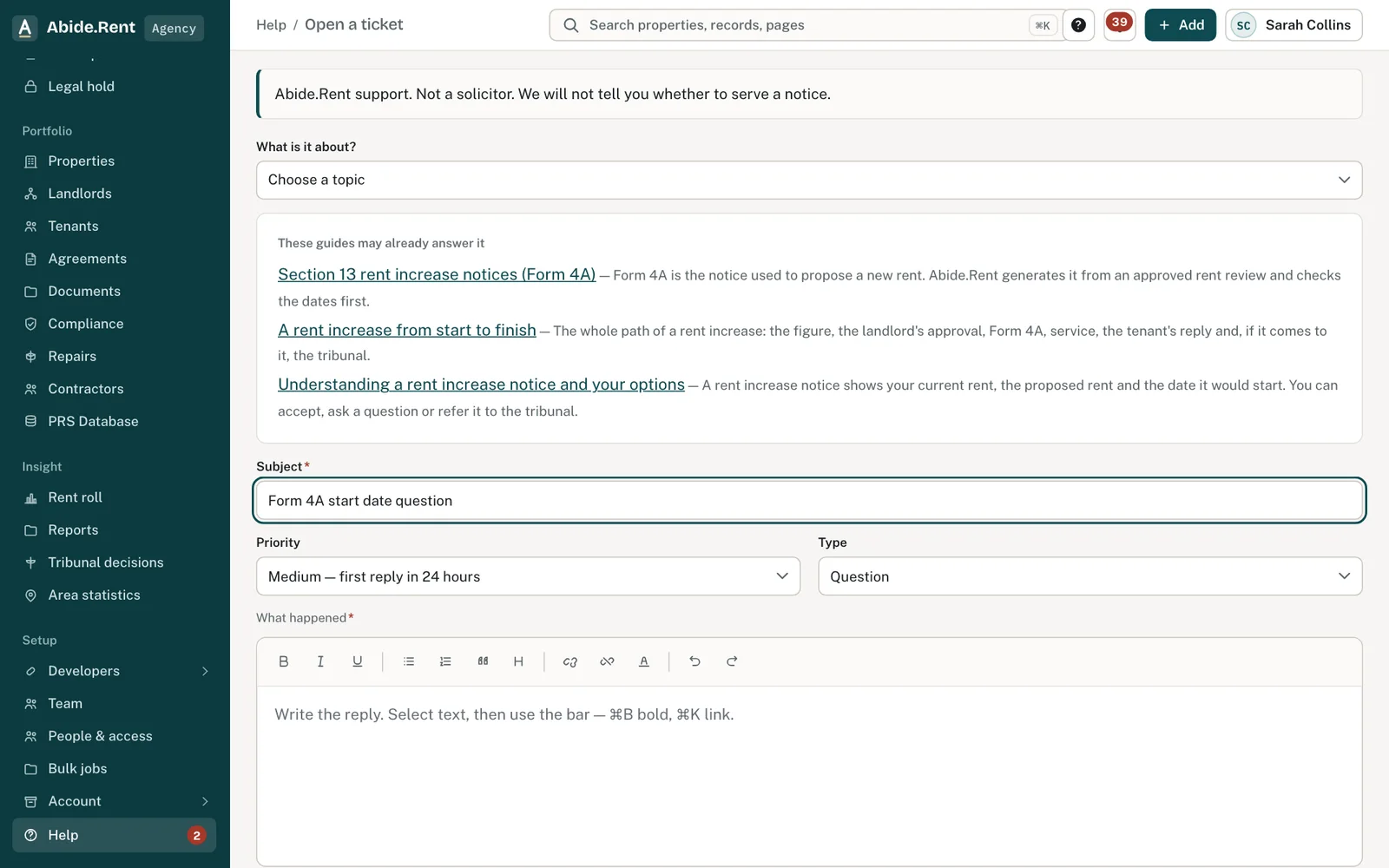
A ticket: topic, subject, priority and type. Your reply comes by email and in Help → Your tickets.
What you are deciding
What kind of help you need, and how urgent it is.
Your options
- A question or a problem. Open a ticket. Choose the topic, priority and type.
- Migrating your records. Choose Request free migration. We import your records for you, free.
- A connection to your other software. Choose Request an integration, name the software and link its API documentation.
- You are a tenant. Ask the landlord or letting agent who invited you; they can raise a ticket for you.
How to do it
- Select Help at the bottom of the menu.
- Choose Open a ticket.
- Choose what it is about, write a short subject and say what you were doing, the property or notice involved, and what went wrong.
- Choose the priority and type (question, incident, problem or task).
- Attach a screenshot if it helps: screenshots, PDFs, spreadsheets, Word files and ZIP folders are accepted.
- Select Send ticket. Replies arrive by email and under Help → Your tickets.
What not to send
Do not attach Right to Rent documents, full bank details or passwords. We never need your login to another system. If you need to send a large file, say so on the ticket and we will send a secure upload link.
Urgent
Choose Urgent for anything about a notice that is already live, or if you think someone has seen data they should not.
A worked example
On Tuesday 20 October 2026 a manager sees that a Form 4A start date is refused. She opens a ticket: topic Notices, subject "Form 4A start date refused for 12 Walmersley Road", priority medium, type question, with a screenshot. The reply arrives the same afternoon, explaining that rent is due on the 3rd and the start date must be the 3rd of a month.
What Abide.Rent does for you
- Keeps every ticket and reply in one thread.
- Links the ticket to your account, so you do not need to explain who you are.
- Emails you when we reply.
If something goes wrong
- “Subject and message are required”
What to do: Fill in both before sending. - “That file is too large (… MB limit).”
What to do: Attach a smaller file, or say on the ticket that you need a secure upload link. - “These files come to … MB. Up to 40 MB can be sent at once.”
What to do: Send some of the files now and the rest in a reply on the same ticket. - “This ticket is closed”
What to do: Open a new ticket and mention the old one. - You are a tenant and cannot see Open a ticket
What to do: Tickets are for landlord and agency accounts. Contact your landlord or agent.
Common mistakes
- Emailing spreadsheets of tenant details instead of using a ticket and the secure upload link.
- Pasting an API key or password into a ticket. We never need one.
What to do next
More in Getting started
 Migrating your records to Abide.Rent: we do it for you, freeSwitching from another system, spreadsheets or folders of documents? Send us what you have and we import it and set you up, at no cost.
 Ask the assistant about your recordsAsk a question about your properties, certificates, notices, repairs and deadlines, and get an answer that links to each record it used.
 Getting started as a landlordAdd a property you let, record its tenancy and dates, and invite your tenant. If an agent manages it, invite your agent instead.