Getting your records ready for the PRS Database
See which properties are missing a registration number, and record the numbers as you receive them.
- Reviewed
- Read
- 2 min
You can use Abide.Rent to see how ready your properties are for the PRS Database, and to keep the registration numbers once you have them.
Who this is for: letting agencies and landlords.
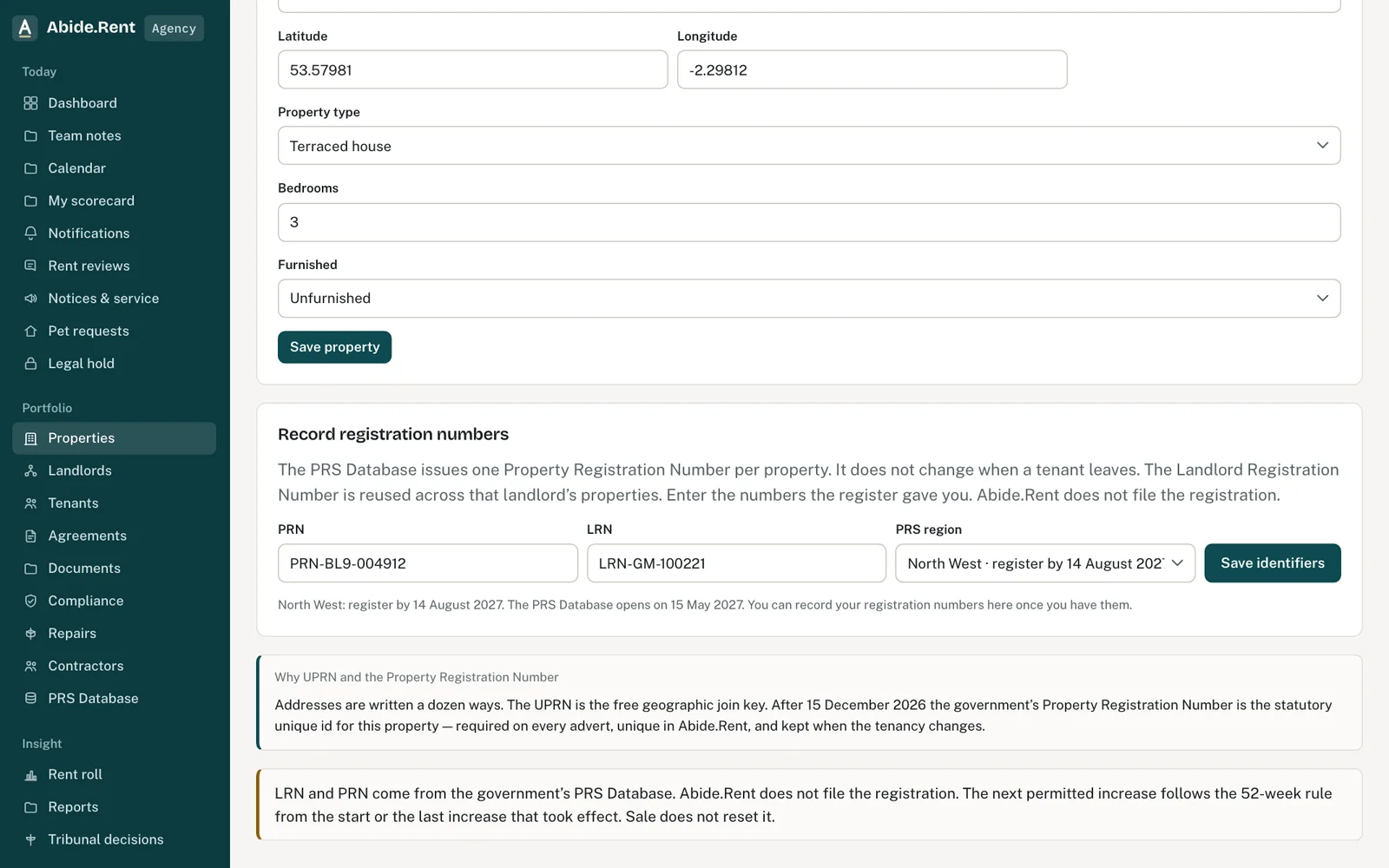
Record the Landlord and Property Registration Numbers.
What you are deciding
Which properties to deal with first.
Your options
- Properties about to be advertised. An advert needs both numbers, so these come first.
- Properties where possession may be sought. Registration comes before a possession notice, except on Grounds 7A and 14.
- Everything else. Work through the list by landlord, so each landlord is asked once.
How to do it
- Open PRS Database. The page lists your properties and shows, for each one, whether a Landlord Registration Number and a Property Registration Number are recorded.
- Open a property and enter the two numbers.
- Save. The property now counts as having both numbers.
- Before a property goes back on the market, check that it shows what an advert needs.
A worked example
On Monday 4 January 2027 an agent opens PRS Database and sees 12 of 40 properties with both numbers. She sorts by landlord: one landlord owns six of the missing ones. He sends his Landlord Registration Number and six Property Registration Numbers on Wednesday 6 January. She enters them in ten minutes; one is refused because that Property Registration Number is already recorded against another property, a typing slip she corrects. The page now shows 18 of 40.
What Abide.Rent does for you
- Shows, property by property, which numbers are recorded.
- Refuses a Property Registration Number that is already recorded against another property.
- Reminds you to update the government's record when a certificate changes on a registered property.
If something goes wrong
- A property shows Property number missing
What to do: Register it, then record the PRN on the property's Edit tab.
Common mistakes
- Entering one landlord's number against another landlord's property.
- Assuming a number is confirmed because it saved. Abide.Rent stores what you enter and does not check it with the register.
What to do next
More in PRS Database
 PRS Database register pack and renewalsEach property's register pack lists what the government's form asks for, ready to copy, with what to fix first. The landlord registers, pays the yearly fee and renews each year.
 The PRS Database: what it is and when it opensThe government's register of landlords and rented properties opens region by region, from 15 December 2026 in the West Midlands. Each region has 3 months to register. Registration is made with the government, not through Abide.Rent.
 Reports across your propertiesSix read-only reports: compliance risk, tenant responses, evidence gaps, PRS readiness, landlord scorecard and team activity.