Contractors and the jobs you send them
Keep your own list of contractors with their trades, areas, registrations and insurance, and send them jobs from a repair or a renewal.
- Reviewed
- Read
- 3 min
Contractors are the tradespeople you send work to. They are not Abide.Rent users: each job reaches them by email with a link to that job only.
Who this is for: letting agencies and landlords.
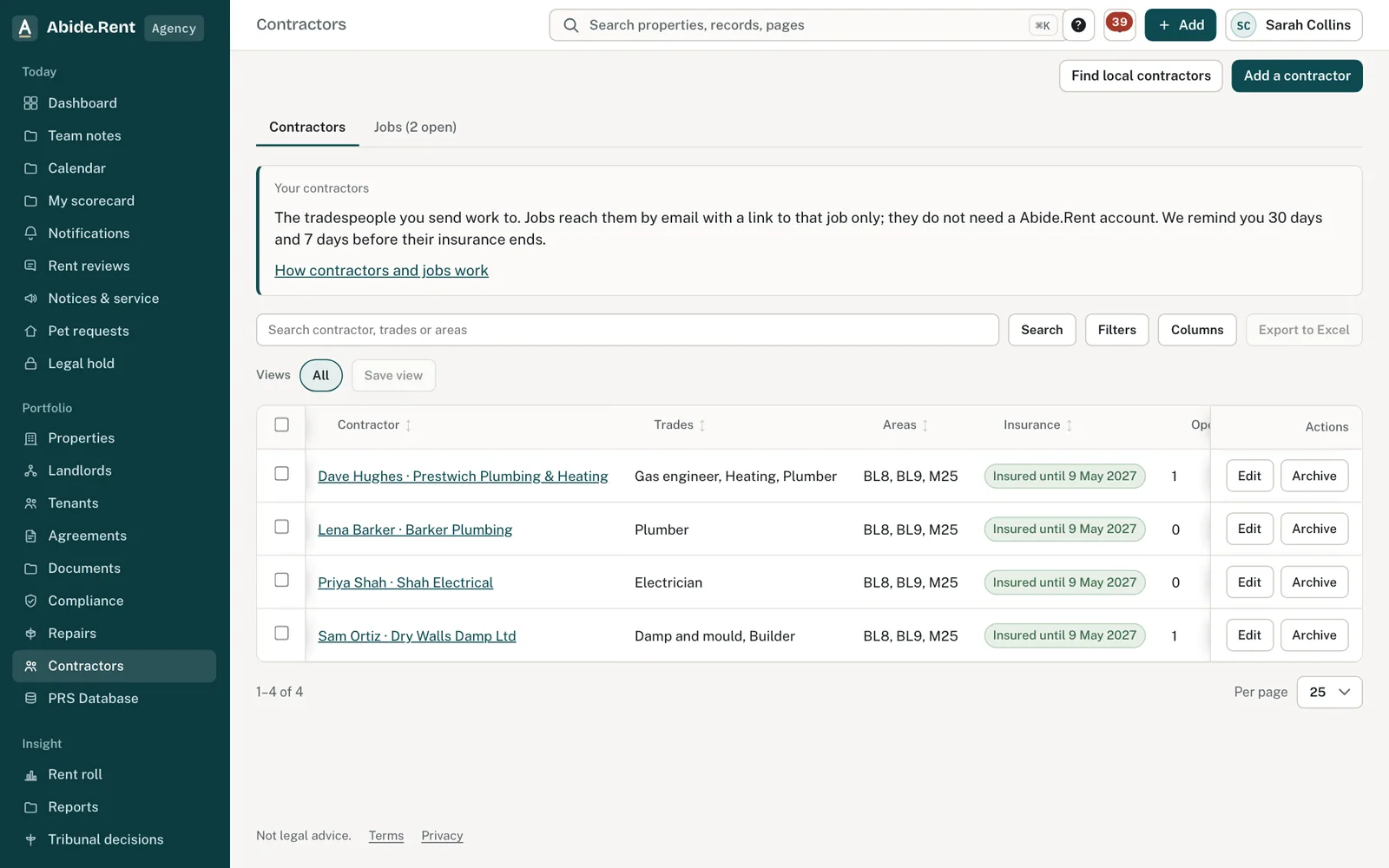
Contractors: trades, areas, insurance and open jobs.
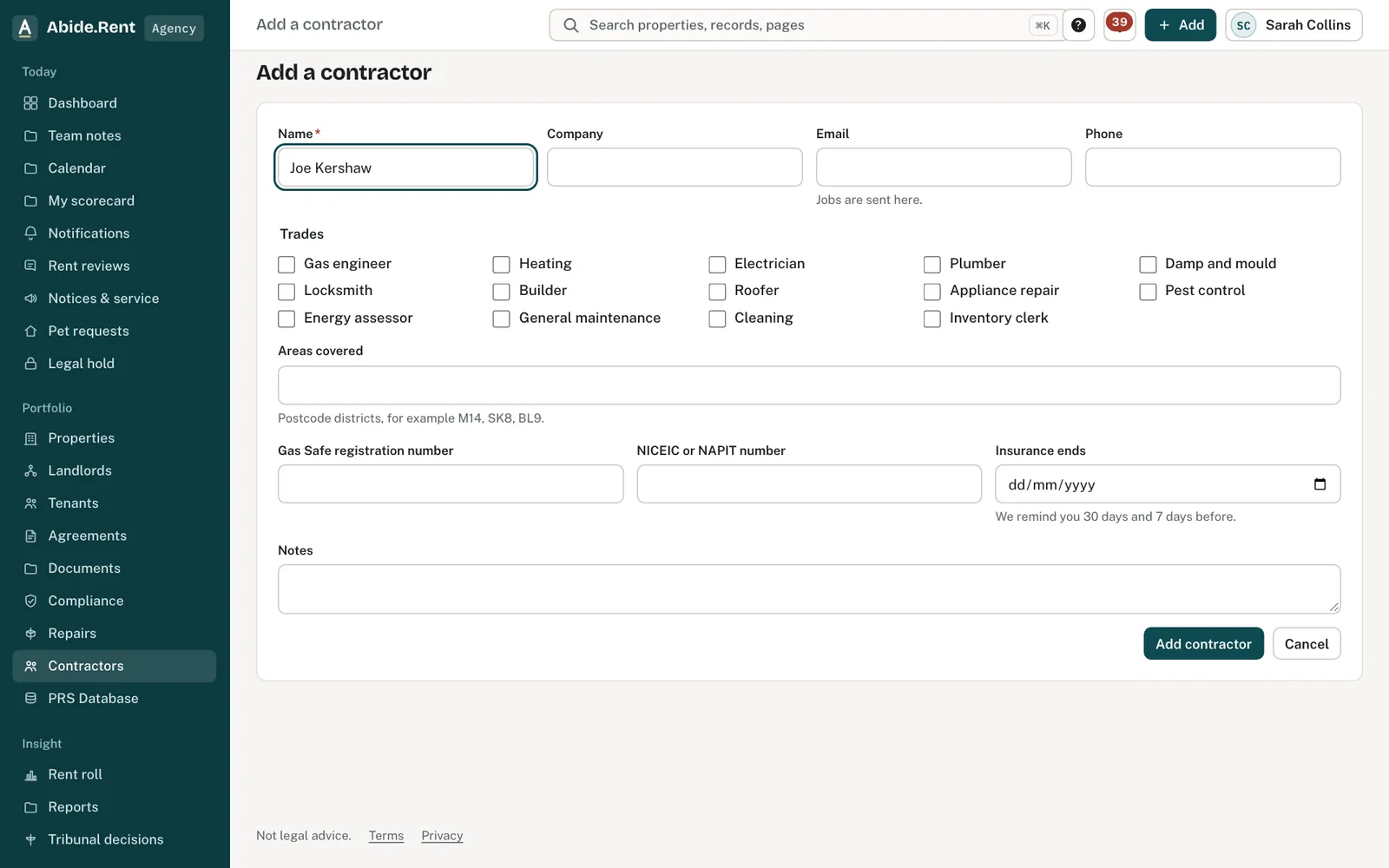
Add a contractor: name, company, email, phone and trades.
What you are deciding
Which contractor to send a job to, and what they need to know before they go.
Your options
- Send a job from a repair. The address, the tenant's description and photos go with it, and the job appears on the repair's trail.
- Send a certificate renewal. From a property's Repairs tab, a gas safety record, EICR or EPC that is due can be sent to a contractor, who uploads the new certificate for you to approve.
- Keep it as a draft. A job is saved before it is sent. Send it when you are ready; until then the contractor is not told.
- Find one locally. No one for a trade in an area? Find local contractors searches Google Maps listings near a postcode or town. Adding a result puts it on your list to complete: a Google listing does not confirm registration or insurance, so check those first.
How to do it
- Open Contractors and select Add a contractor. Record their trades, email, the postcode districts they cover, their Gas Safe or NICEIC/NAPIT number and when their insurance ends.
- From a repair, or a certificate on a property's Repairs tab, select Send to contractor.
- Choose the contractor. Those covering the property's postcode district are listed first.
- Add the due date, what to do and any access notes, then select Email the job.
- Follow the job under Contractors, on the Jobs tab.
A worked example
On Monday 12 October 2026 the EICR at 4 Moss Lane, Bury, is due to expire on 9 November 2026. From the property's Repairs tab the agency sends the renewal to Sana Iqbal of Iqbal Electrical (NICEIC registered, covering BL9), due by 6 November 2026, with the note "Tenant in after 3pm; key safe code from the office". Sana accepts the next morning and books Tuesday 20 October 2026. Her insurance ends on 14 November 2026, so Abide.Rent reminds the agency on 15 October and again on 7 November.
What Abide.Rent does for you
- Keeps your contractors with their trades, areas, registration numbers and insurance date.
- Reminds you 30 days and 7 days before a contractor's insurance ends.
- Emails the job and records every step the contractor takes.
If something goes wrong
- “Add the job's cost before asking the landlord.”
What to do: Enter the cost, then ask for approval. - “No landlord on this property has an Abide.Rent login to ask. If they approved by phone or email, record that instead.”
What to do: Record how the landlord approved it. - “The cost is above the landlord's limit of …”
What to do: Ask the landlord to approve before the work goes ahead. - “Searching local businesses is not available just now. Add the contractor by hand instead.”
What to do: Use Add a contractor. - “Say where to search: a postcode, a town or a property.”
What to do: Give a place for Find local contractors.
Common mistakes
- Adding a contractor with no email address: a job cannot be sent to them.
- Sending a gas job to someone whose Gas Safe number you have not recorded.
- Forgetting to check insurance after the reminder.
What to do next
More in Compliance
 Gas safety, EICR and EPC datesRecord when each certificate expires and be reminded 30 days before. One page lists every date across your properties.
 How the compliance score worksA score out of 100 for each property and your portfolio, from the records Abide.Rent can see. Each record that applies counts equally.
 The monthly compliance statement for each landlordOn the 1st of each month every landlord client gets a statement for the month just ended, in your agency's name. You can also prepare and send any of the last twelve months by hand.