Gas safety, EICR and EPC dates
Record when each certificate expires and be reminded 30 days before. One page lists every date across your properties.
- Reviewed
- Read
- 2 min
Each property keeps its current gas safety record, its electrical installation condition report (EICR) and its energy performance certificate (EPC), with the date each one expires.
Who this is for: letting agencies and landlords.
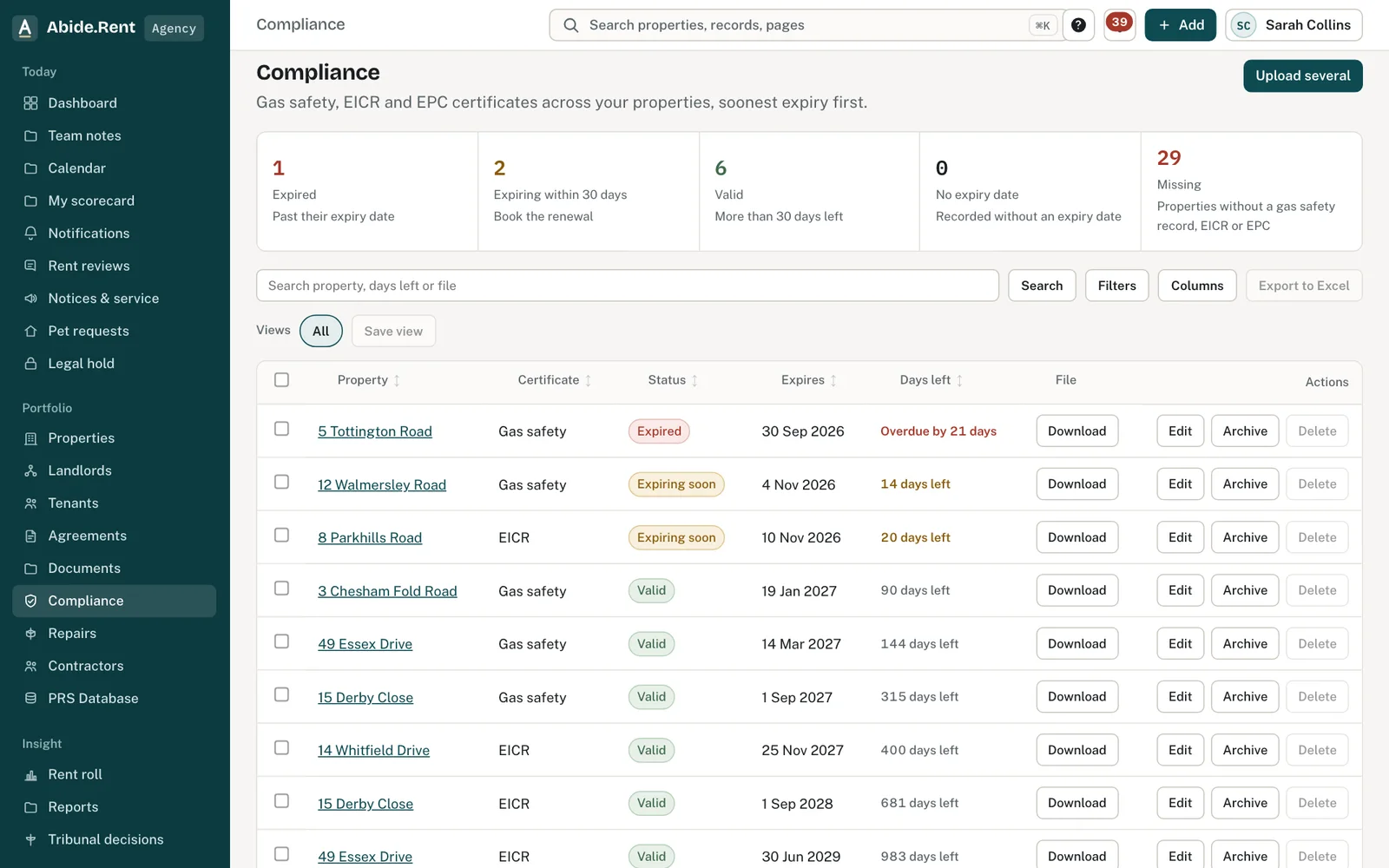
Compliance: expired, expiring, valid and missing.
What you are deciding
Which dates to record first, and who renews each certificate.
Your options
- Record every date you hold. You are reminded 30 days before each one expires, and the compliance page shows the whole portfolio in date order.
- Record dates as certificates are renewed. Less to do today, but nothing reminds you about a certificate you have not entered.
- Leave gas blank where there is no gas supply. The property is not chased for a certificate it does not need.
How to do it
- Open Compliance to see every property and its dates, with anything expired or expiring soon at the top.
- Open a property and select its Compliance tab to add or renew a certificate.
- Enter the expiry date, and attach the certificate as a PDF if you have it.
A worked example
A property's gas safety record expires on Friday 13 November 2026, its EICR on Sunday 14 March 2027 and its EPC, rated C, on Tuesday 9 May 2034. The agency is reminded about the gas safety record on Wednesday 14 October 2026. The engineer visits on Thursday 5 November; the agency uploads the new record with an expiry of Friday 5 November 2027. The old one moves to Previous certificates and the next reminder is set for Wednesday 6 October 2027.
What Abide.Rent does for you
- Reminds you 30 days before each certificate expires.
- Lists expired and soon-to-expire certificates first on the compliance page.
- Shows, for each property, who is recorded as responsible for arranging each certificate.
If something goes wrong
- “Expiry worked out from the check date, not read from the certificate. Check it.”
What to do: Compare the expiry with the certificate and correct it if it differs. - A property shows Missing
What to do: No current record is held. Add the certificate, or record that there is no gas supply. - “Only the account that manages this property can record its gas supply.”
What to do: Ask the managing account.
Common mistakes
- Entering the date of the inspection instead of the date the certificate expires.
- Replacing a certificate by editing the old one. Add the new one; the old one is kept as a previous certificate.
- Assuming a date here means the certificate has been checked. Abide.Rent records what you enter.
What to do next
More in Compliance
 Contractors and the jobs you send themKeep your own list of contractors with their trades, areas, registrations and insurance, and send them jobs from a repair or a renewal.
 How the compliance score worksA score out of 100 for each property and your portfolio, from the records Abide.Rent can see. Each record that applies counts equally.
 The monthly compliance statement for each landlordOn the 1st of each month every landlord client gets a statement for the month just ended, in your agency's name. You can also prepare and send any of the last twelve months by hand.