Who can serve a notice
Serving needs two things: the landlord's written authority recorded on the agreement, and a seat that is allowed to serve.
- Reviewed
- Audience
- Agents
- Read
- 2 min
Serving a notice is a step a person takes in the landlord's name. Abide.Rent offers it only where the agreement records the landlord's written authority and the person's seat allows it.
Who this is for: letting agencies.
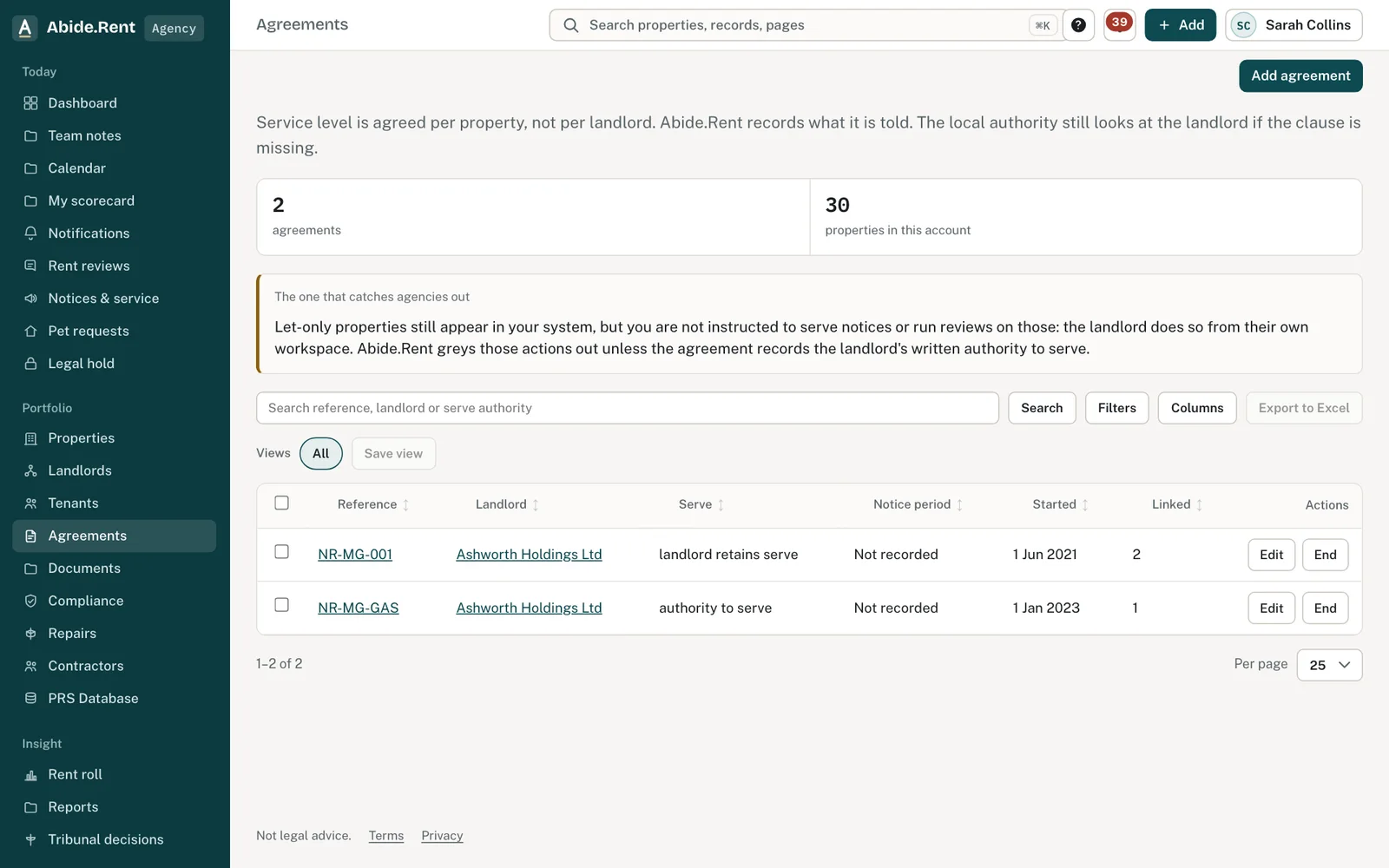
Agreements: who may serve notices on each.
What you are deciding
Who in the team may serve notices, and on which properties.
Your options
- Authority on the agreement. Recorded under the agreement's written terms. Without it, the landlord serves from their own account.
- Can serve on the seat. Set per person under People & access. Owners can serve; managers only if allowed.
- Let only. On a let-only property the agency cannot generate or serve a notice unless the agreement records written authority.
How to do it
- Open Agreements and check the Serve column: Authority to serve or Landlord retains serve.
- To change it, open the agreement and select Edit terms.
- Open People & access and check Can serve for each person.
- Give serving only to people who sign and serve notices.
A worked example
Northgate Residential's agreement NR-MG-GAS records written authority to serve. Owen Marsh, a manager, has Can serve: Yes — written. On Monday 2 November 2026 he generates Form 4A for 12 Walmersley Road, signs it and records service. Priya Naylor, a negotiator, can price and generate but not record service.
What Abide.Rent does for you
- Hides notice actions where authority is not recorded.
- Records who signed and who served each notice.
- Lets the landlord serve from their own account when the agency cannot.
If something goes wrong
- The Serve notice action is greyed out on a property
What to do: Either the service is let only or the agreement does not record written authority to serve. Record it on the agreement, or the landlord serves from their own account. - “The landlord gave this notice from their own workspace and signs it there.”
What to do: The landlord signs and serves that notice. - Someone cannot record service
What to do: Change Can serve for them under People & access.
Common mistakes
- Giving serving to every seat. Keep it to the people who sign and serve.
What to do next
More in People and access
 Invite a landlord, a tenant or a colleagueSend an email invitation so a landlord, tenant or colleague can sign in and see the records that concern them.
 Notes and @mentions on any recordWrite a note on a property, notice, rent review, agreement, landlord or tenant, and type @ to tell a colleague or the landlord.
 What your landlord sees: the activity feedA landlord's home page lists what was done on their properties in the last 30 days, and by whom: notices, safety records, deposits, repairs, inspections and registrations.