Notifications and which ones you can switch off
Choose which emails and reminders you get. Statutory messages, such as a notice served on you, cannot be switched off.
- Reviewed
- Read
- 3 min
Everything that concerns you is listed under Notifications, whether or not you also get an email about it.
Who this is for: letting agencies, landlords and tenants.
Notifications: deadlines, certificates, notices and pet requests.
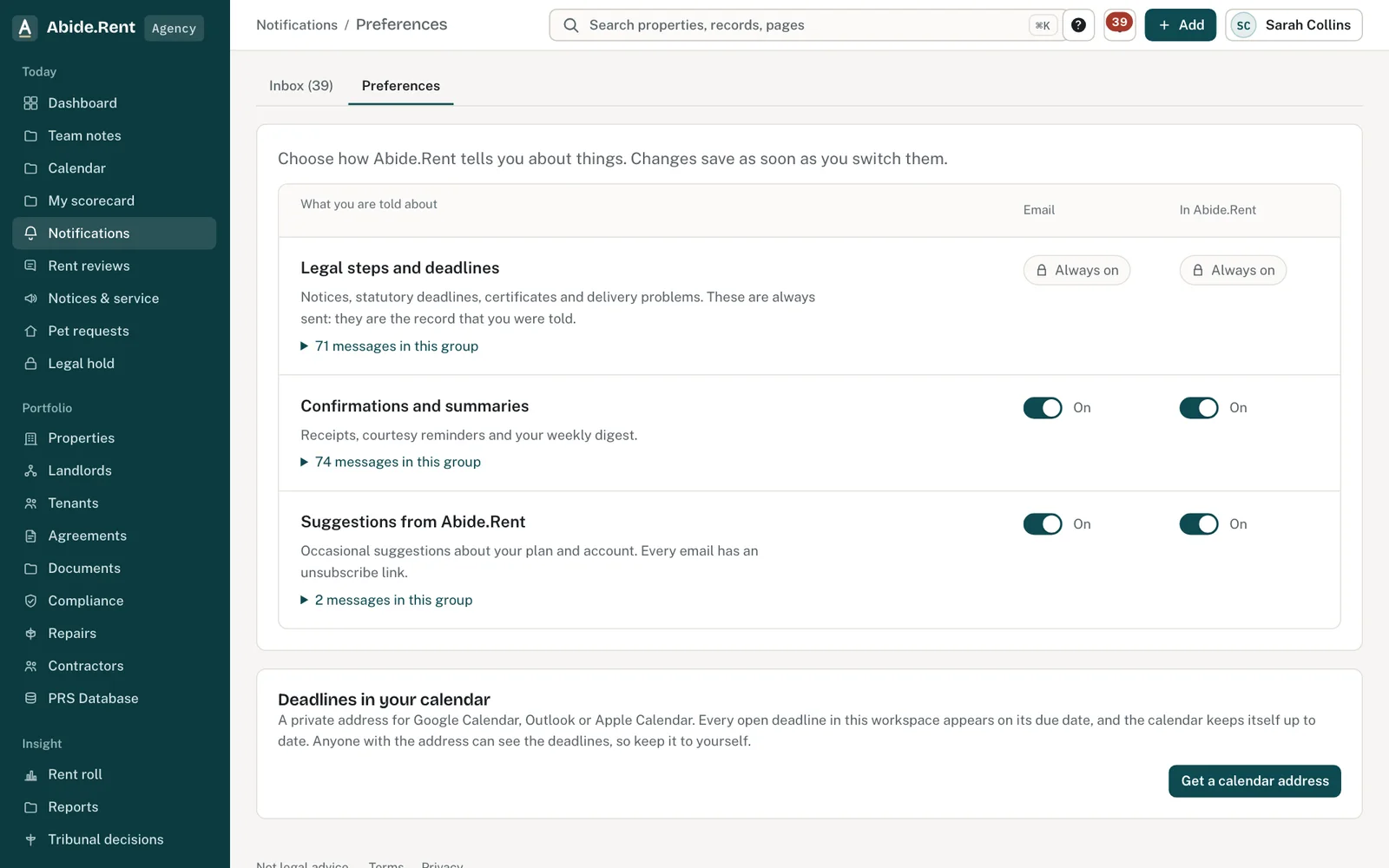
Turn each kind on or off for email and in Abide.Rent. Some legal deadlines stay on.
What you are deciding
Which emails you want, and which you would rather read in Abide.Rent only.
Your options
- Keep every email on. You hear about each change as it happens.
- Switch off the optional ones. Reminders and summaries stop arriving by email. They still appear under Notifications.
- Choose how often summaries arrive. Every working day: a list at 07:00 of what is overdue, due today, waiting on you and due this week. Or Mondays only, or no summaries.
- Statutory messages. A notice served on you, and messages like it, are always sent. They cannot be switched off, here or from an unsubscribe link.
How to do it
- Open Notifications, then Preferences.
- Each kind of message has its own switch. Move a switch and it is saved at once.
- Switches shown as locked are statutory messages.
- Under Summary emails, choose Every working day, Mondays only or No summaries.
A worked example
A landlord with one managed property gets three kinds of email in October 2026: a reminder on Wednesday 14 October that a gas safety record expires on Friday 13 November, a request on Monday 19 October to approve a rent review, and a weekly summary. He switches the weekly summary off. The reminder and the approval request still arrive, and the summary's contents are still under Notifications. His tenant cannot switch off the email that tells her a notice has been served.
What Abide.Rent does for you
- Keeps every message under Notifications, with a count of the ones you have not read.
- Sends certificate reminders before each expiry date.
- Emails agency and landlord staff a list at 07:00 on their working days of what needs them, each item with its own link. Courtesy reminders about the same things stay in Abide.Rent instead of arriving one email at a time.
- Puts an unsubscribe link in optional emails only; opening the link changes nothing until you confirm.
If something goes wrong
- You still get an email you switched off
What to do: Some legal deadlines cannot be switched off. Everything else follows your preferences from the next email. - “Push notifications are not switched on yet.”
What to do: Use email and in-app notifications for now. - You did not get the daily list
What to do: It is sent on your working days only, never while you are on leave, and only when something needs you. Check Summary emails, and that Confirmations and summaries is on for email.
Common mistakes
- Switching reminders off and then relying on memory for expiry dates. The compliance page still lists them.
- Looking for a way to stop statutory messages. There is none.
What to do next
More in People and access
 Invite a landlord, a tenant or a colleagueSend an email invitation so a landlord, tenant or colleague can sign in and see the records that concern them.
 Who can see whatAn agency sees the properties it manages, a landlord sees their own, and a tenant sees their own tenancy. Each page shows who has access.
 Landlord and tenant at the same timeOne person can be a tenant at one address and a landlord at another. The roles are kept apart, and each side sees only its own.