Reporting a repair
Report a repair to your landlord or agent in writing. Their contact details are on your tenancy.
- Reviewed
- Audience
- Tenants
- Read
- 2 min
Report a repair in Abide.Rent, with photos, and follow it until it is fixed. Your landlord or letting agent is told straight away.
Who this is for: tenants.
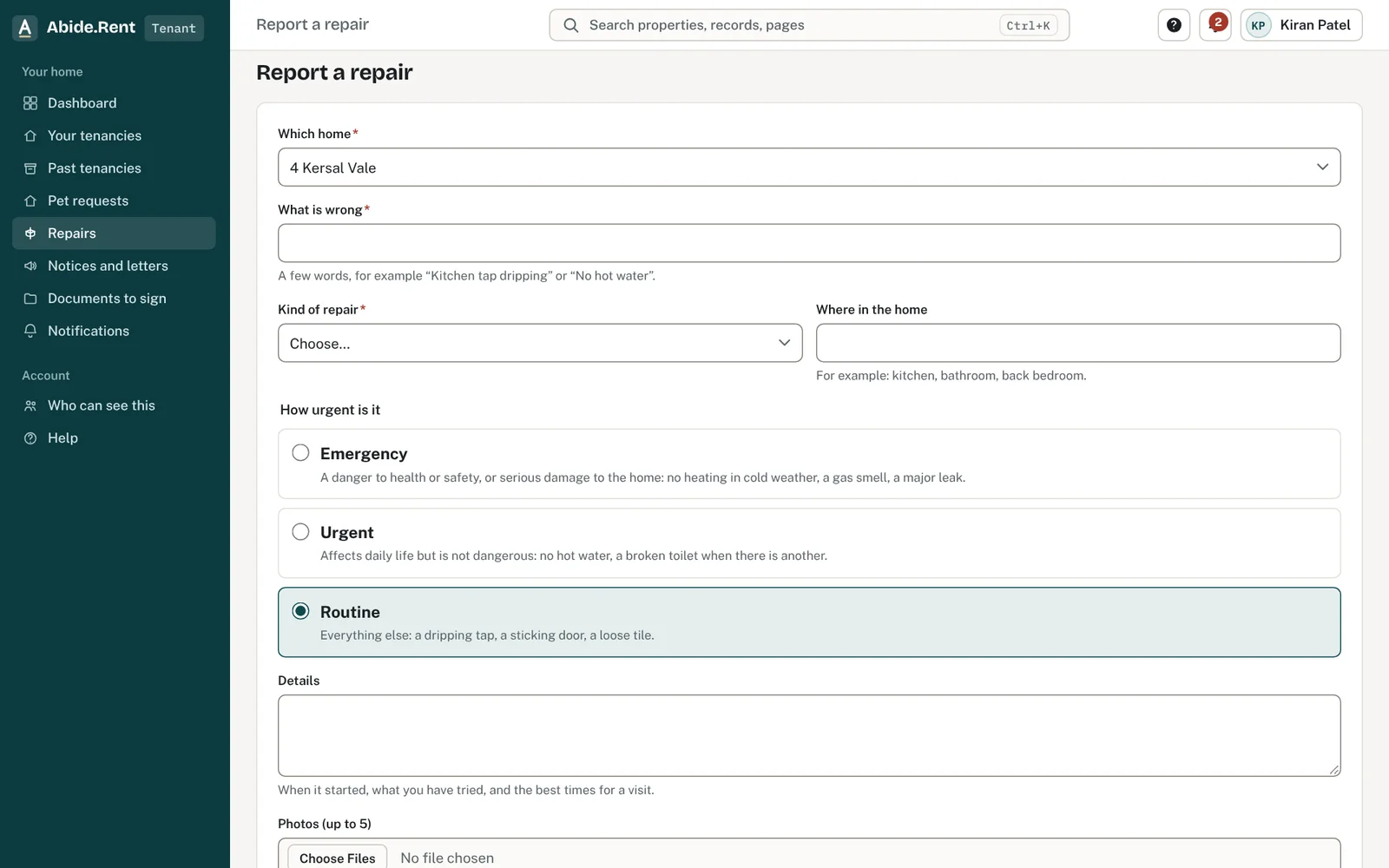
Report a repair: the home, what is wrong and photos.
What you are deciding
Who to tell about a repair, and how.
Your options
- In Abide.Rent. Select Repairs, then Report a repair. Say what is wrong, where, and how urgent it is, and add up to five photos. You can see each change of status and any notes, and you are told when it changes.
- Your agent, if the property has one. Your tenancy's Contact tab shows the agent's phone number and email address. Where an agent manages the property, start with them.
- Your landlord. Shown on the same tab. Use this where the landlord manages the property themselves.
- In writing. An email or a letter gives you a dated record of what you reported and when. If you phone because it is urgent, follow it with an email.
How to do it
- Select Repairs, then Report a repair.
- Say what is wrong, where in the home, and how urgent it is. If you smell gas, leave the home and call the National Gas Emergency number on 0800 111 999 first.
- Add photos if they help, and the best times for a visit.
- Follow the repair under Repairs. If it is urgent, phone too: your tenancy's Contact tab shows the agent or landlord.
A worked example
On Tuesday 10 November 2026 Nia's boiler stops. At 08:40 she reports it in Abide.Rent as urgent, with two photos: "The boiler at 12 Market Street stopped heating last night. I am in all day Wednesday and Thursday." Fern Lettings, her agent, marks it acknowledged at 09:15 and books an engineer for Wednesday 11 November, with a note she can read under Repairs. She is told when it is marked fixed.
What Abide.Rent does for you
- Keeps your repair, your photos and every change of status with dates, and tells you when it changes.
- Shows who your landlord and agent are, with their contact details.
- Shows the agent's redress scheme where the agency has given it.
- Keeps your own copy of every notice and letter on your tenancy.
If something goes wrong
- “Choose the property or tenancy.”
What to do: Pick the home. - “One of the files is too large. Photos can be 5 MB and PDFs 10 MB.”
What to do: Use smaller photos. - If you smell gas
What to do: Leave the property, do not use switches or flames, and call the gas emergency number before reporting it here.
Common mistakes
- Reporting by phone only, with nothing in writing.
- Writing to an old address for a previous agent. The Contact tab shows who manages your home now.
What to do next
Keep reading
All help articlesMore in For tenants
 What you can do in the tenant portalSee your tenancy, read and answer notices, ask to keep a pet, give notice, and keep your own copy of everything.
 Your rent account and deposit informationSee the rent due and the payments your landlord or agent has recorded, and confirm you have received your deposit information.
 I cannot see my tenancyYour tenancy appears once your landlord or letting agent invites you using the email address you signed up with.